1. Standby- Flat
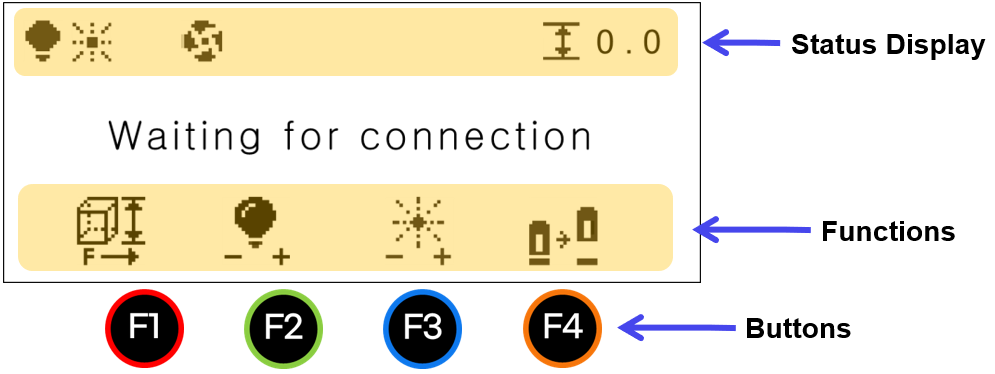
| Status | ||
|---|---|---|
 |
LED Light | Brightness levels |
 |
Focus Pointer | Brightness levels |
 |
Dust Collector | Dust collector ON/OFF: Icon does not appear when OFF |
 |
Z-axis Position | Z-axis Position: Material height |
| Functions | ||
|---|---|---|
 |
Height | • Move to a preset height: Short-press the button to move the laser focus to a preset height.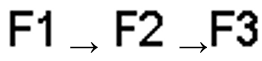 • Save preset values: Long-press the button to save laser focus preset values. |
 |
LED Light | Brightness levels There are 4 levels of brightness control. Each time the button is pressed, the level changes as well as the level cycles. 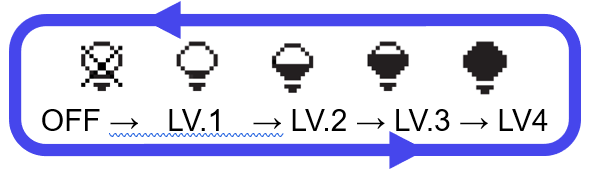 |
 |
Focus Pointer | Brightness levels There are 4 levels of brightness control. Each time the button is pressed, the level changes as well as the level cycles. 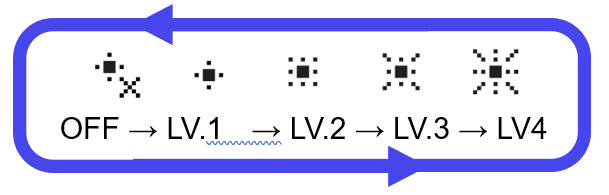 |
 |
Cover | Opens/closes the front cover. |
Go to the L3 Prime Descriptions➜